Your machine
OrgAtlas desktop, Salesforce project, generated org intelligence, source files, local apps, reports, documents, and other artifacts.
The working workspace.
We don't have to. It's local. We don't store your prompts, Salesforce data, business rules, source code, local files, or model-provider choice.
Other vendors ask you to trust their cloud. You do not have to trust us with a cloud copy. There isn't one.
The desktop connects directly to Salesforce and the AI provider you choose. The account service stays separate from the Salesforce workspace.
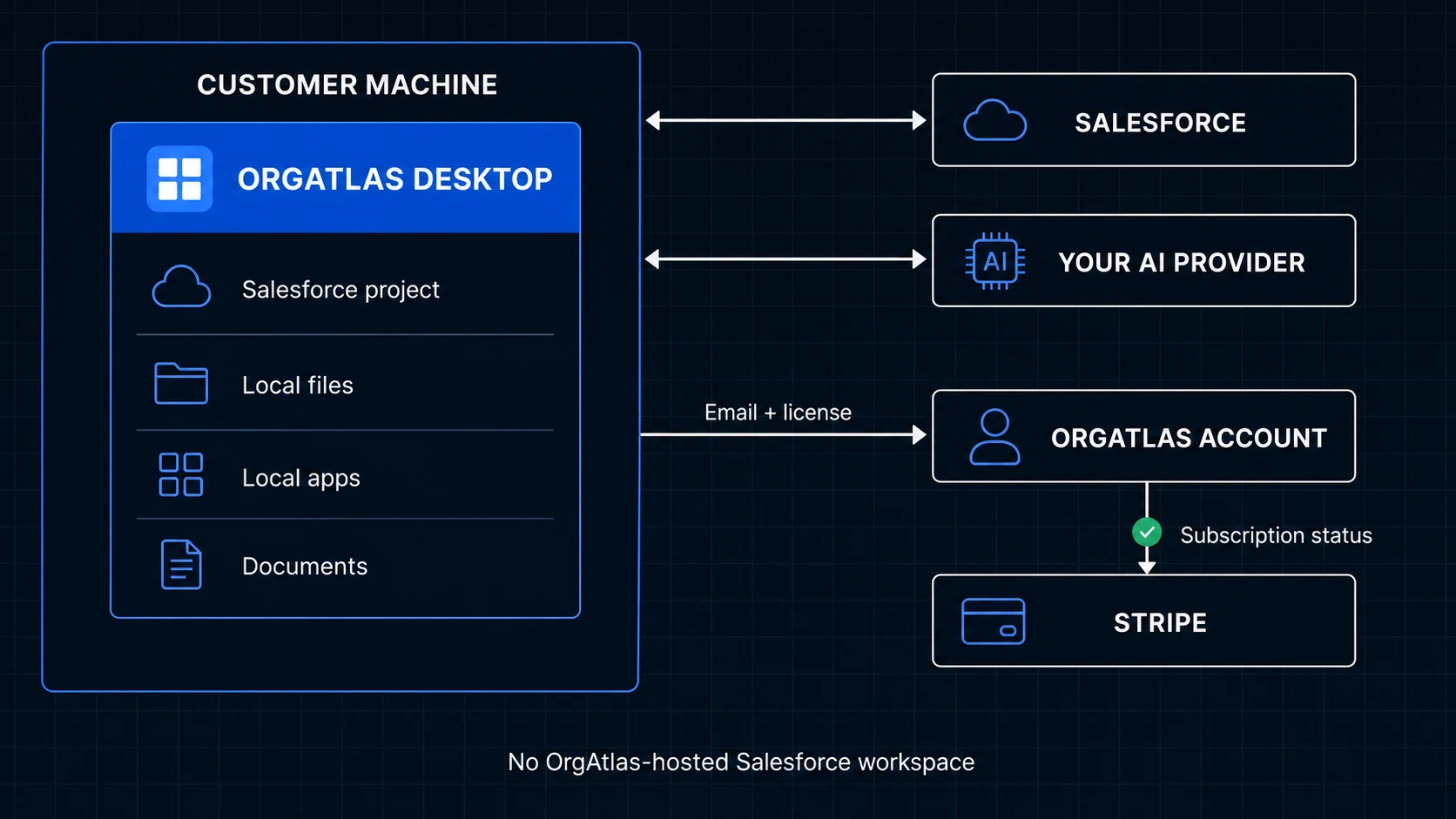
OrgAtlas desktop, Salesforce project, generated org intelligence, source files, local apps, reports, documents, and other artifacts.
The working workspace.
Metadata, data, configuration, validation, and authorized org operations through your Salesforce access.
The explicitly selected org.
Prompts and selected context sent to produce a response.
Handling follows the provider, account, model, and terms you select.
The personal information needed to manage your account and license, plus minimal user, trial, entitlement, license, and Stripe subscription identifiers.
Access and licensing—not a hosted Salesforce workspace.
A bounded product-catalog payload processed in memory when you use that feature.
The request payload is not stored.
Hosted checkout, card and billing details, invoices, payment-method changes, and cancellation.
Billing is handled by Stripe.
We collect only the personal information needed to manage your account and license, such as your name and email address—not your Salesforce data. Minimal internal identifiers and entitlement records authenticate the desktop and manage the license.
Prompts and selected context needed for a task go directly from the desktop to the AI provider and model you choose. Their handling follows their terms. OrgAtlas does not resell the model to you. You can also connect a local model served through Ollama or LM Studio when that model and your hardware are suitable for the work.
Stripe handles checkout, card details, invoices, payment-method changes, and cancellation. OrgAtlas does not store your full card information. One optional CPQ validation can process a bounded catalog payload in memory; it is not stored.
It is on by default and enforced at the supported Salesforce tooling paths—not painted over a chat box as a safety slogan.
Every Salesforce project starts in read-only mode.
Supported Salesforce data-mutation paths are blocked while read-only mode is active.
Supported Salesforce metadata and code deployment paths are blocked while read-only mode is active.
One local project is bound to one selected Salesforce org and that target is passed explicitly to Salesforce tools.
When you are ready to write data or deploy supported code and metadata, turn read-only mode off and ask for the action. OrgAtlas still targets the explicitly bound org, uses the applicable permission boundaries, and keeps the work visible for review.
OrgAtlas provides recommendations, but it does not force every customer into one model vendor. Bring a supported API key or connect a supported existing ChatGPT Plus, ChatGPT Pro, or GitHub Copilot subscription.
You control the provider relationship and can choose based on privacy terms, capability, speed, price, and the sensitivity of the task.
Your machine. Your provider. Your org. Your approval.
Download the desktop app, connect the intended org, and start in read-only mode.